How to Download WhatsApp on iPhone in China: Get the Business App Directly (Tested 2026)
A client leaves a WhatsApp number at the end of an email. You open the App Store on your iPhone, search, and nothing comes up. You look online, and almost every top guide says the same thing: go buy a US Apple ID.
Hold off on buying one. How you download WhatsApp on an iPhone in China depends on which app you need. The China App Store removed the personal app, WhatsApp Messenger, but WhatsApp Business, the one most export and trade teams use, can still be downloaded directly with a China account. We confirmed this with a China mainland account on October 16, 2026.
This guide follows the real workflow of someone in foreign trade: pick the right app, download it, register, move your chat history, and then lock in a stable connection so a brand-new account isn't flagged. If you need the personal app, there's a separate section for that too.
Can You Download WhatsApp Business from the China App Store? Yes
Yes. On April 19, 2024, Apple removed WhatsApp Messenger from the China App Store at the request of regulators, but WhatsApp Business was not removed. As of October 16, 2026, searching "WhatsApp Business" with a China Apple ID still lets you install it directly, with no region switch.
The removal was widely reported at the time, for example in Business Today's report on Apple removing WhatsApp. Many guides were written around then and never rechecked, so they still say you must switch to a US account.
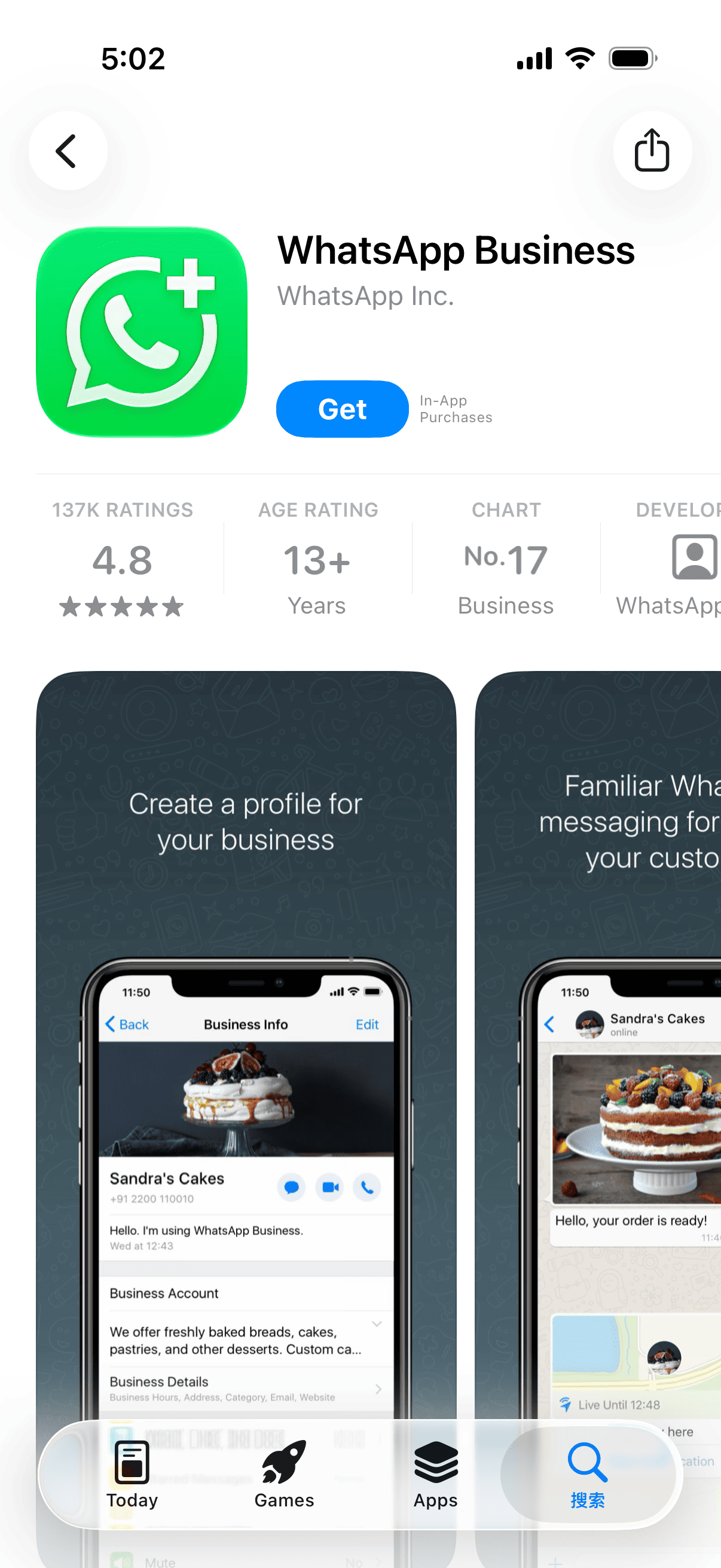
The screenshot above was taken with a China mainland account. The phone's system language is set to English, which is why the button reads "Get".
Use this table to see which case you're in:
| What you want to install | Available in the China App Store? | What to do |
|---|---|---|
| WhatsApp Business (recommended for trade) | Yes | Go straight to "How to Download WhatsApp Business on iPhone" below |
| WhatsApp Messenger (personal) | No | You need a non-China Apple ID. If you don't have one, see how to create a US Apple ID for free |
| An old Messenger install that won't update | No | Same as above, see "Still Need the Personal Messenger App?" below |
WhatsApp or WhatsApp Business: Which One for Trade?
Both apps come from the same company and the chat screens look almost identical. The difference is that Business adds a set of tools for talking to customers. According to WhatsApp Business's official product page, the main differences are:
| Feature | WhatsApp Messenger | WhatsApp Business |
|---|---|---|
| Business profile (name, address, hours, website) | No | Yes |
| Greeting for new chats, away message | No | Yes |
| Product showcase and pricing | No | Yes |
| Best for | Personal contacts | Talking to clients |
For trade work, the away message alone is worth the switch. Clients in Europe and the Americas are working while it's the middle of the night in China. With an away message, an inquiry gets an instant reply instead of silence.
You can install both apps on the same iPhone, but each one needs a different phone number. A common setup is your personal number on Messenger and a company number or second SIM on Business.
How to Download WhatsApp Business on iPhone
With a China account, it takes four steps and no account switching:
- Open the App Store and tap Search in the bottom right
- Type the full name WhatsApp Business. Typing only "WhatsApp" mixes in unrelated apps
- Open the app page and check that the developer is WhatsApp Inc.
- Tap Get, confirm with Face ID or your passcode, and wait for it to install
Note: don't skip step 3. Search results often include look-alike multi-account tools and marketing apps, many with green icons. Installing the wrong one won't work, and it may hand your chat data to a third party.
If the app keeps spinning or stays on "Connecting" after you open it, the download is fine. It's a network connection problem. Skip ahead to "Set Up a Stable Connection Before Your First Login".
Still Need the Personal Messenger App?
The personal app has been removed from the China App Store, so you have to download it with a non-China Apple ID. If you don't have a US account, follow our main guide to create one. It doesn't need a credit card and won't affect your existing China account.
Since iOS 26.4, there's no sign-out button inside the App Store. The switch now goes through Settings → Apple Account → Media & Purchases. Only switch "Media & Purchases". Do not tap the red "Sign Out" at the bottom of the page, because that signs your whole device out of iCloud. See the full steps and screenshots in how to switch to the US App Store without losing iCloud. As of October 2026, this path hasn't changed.
If your phone already has an old Messenger app installed with a China account and it now says it can't update, that's the same cause. Back up your chats before deleting the old app, then download it again with the US account.
Registering WhatsApp Business: Phone Numbers and Verification Codes
Downloading is only the first step. Registration is where most people in trade actually get stuck.
Which Number to Register With
| Number type | Can you register? | Notes |
|---|---|---|
| China +86 mobile number | Worth trying | Some numbers don't receive the SMS, see troubleshooting below |
| Overseas mobile number | Yes | Must reliably receive SMS or calls |
| Company landline | Yes | Choose voice call verification; extensions don't work |
Many people don't know a landline works. WhatsApp Business lets you verify with a fixed line: wait for the SMS option to time out, then choose a voice call, and the system calls the landline and reads out the code. A main line with extensions won't work, because the phone menu blocks the verification call.
Note: once a number is registered as a Business account, don't use it to register the personal app. Decide up front whether the number is for clients long-term or for personal use.
What to Do If the Verification Code Doesn't Arrive
Missing codes are the most common problem with +86 numbers. Work through this table from top to bottom:
| Symptom | Likely cause | Fix |
|---|---|---|
| The SMS never arrives | International SMS blocked by the carrier or phone | Check the Messages app's junk and filter lists, and turn off third-party blocking apps |
| No SMS and no call | Wrong number format | Choose "China +86" as the country code, and don't add a leading 0 |
| Chose voice verification but no call came | International calls blocked | In Settings → Apps → Phone, check whether "Silence Unknown Callers" is on, and turn it off while troubleshooting |
| Dual-SIM phone never receives it | Code went to the other SIM | Make sure the number you entered matches the SIM that's receiving |
| "Try again later" after several requests | Rate limit triggered | Stop retrying and wait out the countdown; retrying only makes the wait longer |
Set Up a Stable Connection Before Your First Login
This section decides whether your account stays usable long-term.
A lesson people in foreign trade repeat often: WhatsApp treats frequent changes in your login IP as a warning sign. An analysis of WhatsApp risk controls on Woshipm (in Chinese) also points out that switching networks often, or turning your connection on and off, tends to trigger risk checks. New accounts are especially sensitive.
Picture this: you register the account on office WiFi in the morning, reply to a client on mobile data on the subway in the afternoon, and switch to yet another network at home in the evening. To you, it's a normal day. To the platform, a brand-new account just logged in from three different places in one day.
So before you register, do two things:
- Pick a server in the same region as your main clients. Clients in the US, choose the US; clients in the Middle East, choose a nearby region
- Use that same server for registration and everyday use. Don't use the US today and Singapore tomorrow
With SealVPN, once you select a server, your exit IP stays the same and doesn't drift while you're connected, which is exactly what this needs. To be clear, the IP on a server is shared by multiple users, so it isn't a dedicated IP. If an account has already been flagged, switch to a different server and keep using that new one.
To check whether your IP is stable, connect, open any IP lookup site, and note the result. Check again a few hours later. If both match, there's no drift.
Already Using the Personal App? Move Your Chats to WhatsApp Business
If you've been talking to clients on the personal app and don't want to lose those chats, you can move the same number to Business:
- In the personal app, go to Settings → Chats → Chat Backup and tap Back Up Now to save to iCloud
- Install WhatsApp Business and verify the same phone number
- Follow the prompts to restore your chat history and wait for it to finish
After the move, the number works only in Business, and the personal app signs out automatically. Before you start, make sure you have enough free iCloud storage for the backup, or it will fail.
Frequently Asked Questions
Could WhatsApp Business also be removed from the China App Store someday?
There's no way to predict that. What's certain is that it was still available in the China App Store as of October 16, 2026. Even if it's removed later, an app you've already installed usually stays on your phone; you just can't update it from the China store. We'll recheck and update this article regularly.
Do I need to buy a US Apple ID to download WhatsApp Business?
No. A China account can download it. Only the personal Messenger app needs a non-China account, and you can create a US account yourself for free. Shared accounts bought online can be locked or have their password changed by the original owner, so we don't recommend them.
Does an old Messenger app installed with a China account still work?
An existing install still opens for now, but it can't update. Once the version gets too old, features may break or you may not be able to log in. Back up your chats first, then reinstall with a US account as described above, or move straight to Business.
Will using WhatsApp over a VPN get my account banned?
What matters isn't whether you use a VPN. It's whether your IP is stable and whether your behavior looks normal. For the first few days, don't add lots of strangers or send bulk messages. Being reported as spam by recipients is a far more common reason for bans.
Summary
Back to the WhatsApp you couldn't find. Three things are enough:
- For trade, use WhatsApp Business. Download it directly from the China App Store, check that the developer is WhatsApp Inc., and skip buying a US ID
- If a +86 number doesn't get the code, check SMS blocking and unknown-caller settings first. A company landline can also verify by voice call
- Before registering, pick one server close to your clients and use it for registration and every day after, so the account starts on a stable connection
Once that's done, the next time a client sends an inquiry in the middle of your night, they'll get an automatic reply right away, and you can follow up calmly in the morning.
If you need a connection where your IP doesn't drift once you pick a server, you can download SealVPN for iPhone or create a SealVPN account and connect in one tap.
Tested on October 16, 2026. App Store availability and WhatsApp registration rules may change, so go by what you see on screen.
References: